Suggested Download
Detecting your system...
All DownloadsInstaller


Setup-PicView-v5.1.3-win-x64.exe
30.3 MB
Setup-PicView-v5.1.3-win-arm64.exe
27.5 MB
Portable Windows x64
PicView-v5.1.3-win-x64.zip
40.2 MB
Portable Windows arm64
PicView-v5.1.3-win-arm64.zip
36.3 MB
macOS arm64 (Apple Sillicon)
PicView-5.1.3-macOS-arm64.dmg
54.7 MB
macOS x64
PicView-5.1.3-macOS-x64.dmg
62 MB
If you like PicView, consider giving it a star on GitHub or Buy me a coffee
Give PicView a like on AlternativeTo!
Setup-PicView-v5.1.3-win-x64.exe
30.3 MB
Setup-PicView-v5.1.3-win-arm64.exe
27.5 MB
PicView-v5.1.3-win-x64.zip
40.2 MB
PicView-v5.1.3-win-arm64.zip
36.3 MB
PicView-5.1.3-macOS-arm64.dmg
54.7 MB
PicView-5.1.3-macOS-x64.dmg
62 MB
If you like PicView, consider giving it a star on GitHub or Buy me a coffee
Give PicView a like on AlternativeTo!





What’s newn PicView 5.1.3
Bug fixes
- Fixed possible image size miscalculation when gallery is docked.
- Fixed janky zoom out animation.
- Fixed instances where the hoverbar didn’t show when starting up in fullscreen mode.
- Fixed instances of incorrect image size when the top title bar is hidden.
macOS
- Fixed incorrect layout after expanding and contracting the gallery when docked to the side.
- Fixed gallery not centering correctly after expanding or contracting.
- Slightly adjusted title bar position for macOS 27 bigger traffic lights buttons.
Windows
- Fixed window not starting up correctly.
What’s new in PicView 5.1.2
Bug fixes
- Fixed the
Application shortcutsnot working. - Fixed the gallery not hiding when loading an image through URL.
- Fixed incorrect display in the language selection combo box.
- Fixed the
Optimize imagebutton not being disabled when the image format was not supported. - Fixed erratic horizontal gallery scrolling behavior.
macOS
- Fixed the startup logic to no longer cause blinking because of excessive window resizing when
Auto-fit windowis enabled. - Fixed the window not centering when
Auto-fit windowis enabled.
Internal updates
- Updated Avalonia to 12.1.2.
What’s new in PicView 5.1.1
Bug fixes
- Fixed incorrect thumbnail rendering when the gallery is docked to the side.
- Fixed some issues with more than one gallery item thumbnail being selected.
- Fixed an issue where disabling docking was greyed out incorrectly.
- Fixed missing background for the photo overlay badge.
Windows
- Added the
picview-ffmpeg.dllfile in a new plugin directory.
macOS
- Fixed unresponsive update button.
What’s new in PicView 5.1.0
Gallery Virtualization: Significantly improved gallery loading by implementing UI virtualization. This drastically reduces loading times and memory consumption. Even when browsing folders containing hundreds or thousands of images, navigation will remain fast and responsive.
Motion Photo Support: Added native playback for Motion Photos (Live Photos) directly within PicView. This works right out of the box with absolutely no third-party dependencies required.
Smoother Archive Extraction: The user experience when navigating and extracting archives has been greatly enhanced. Extractions are now intelligently batched in groups of 10 and feature a new progress indicator. This makes the app feel much smoother, especially in scenarios like viewing files over a remote or network connection.
Light Theme Overhaul: The light theme has received a massive overhaul to bring it up to the high standards of the default dark theme. Both themes has new refined icons, and significantly improved visual contrast across the interface.
Bug fixes
Corrected the labels for the rotation symbols in the context menu.
Resolved a startup crash that could occur if a mouse click was registered too early.
Fixed a crash that occurred when attempting to load file history if no previous history existed.
macOS
- Fixed an issue where the macOS file open dialog would become completely unresponsive until the application was manually refocused.
Windows
- Fixed a regression that caused native Windows thumbnails to render upside down.
Internal updates
- Updated Magick.NET to 14.17.1.
What’s new in PicView 5.0 to 5.0.6
This release introduces a new tabbed interface alongside a major architectural overhaul. Window sizing has been completely rebuilt for more intuitive behavior, while the navigation system now shares image caches across tabs and windows to reduce memory usage.
Highlights
- 🗂️ New tabbed interface
- 🪟 Completely redesigned window sizing
- ⚡ Lower memory usage through shared image caching
- 🖼️ Dockable image gallery
- 🔍 Searchable Settings window
- 📦 Instant archive preview while extraction continues
⚠️ Important Upgrade Notes
- Settings reset: Gallery settings will not be preserved because they have been completely reworked.
Auto-fit windowis also now disabled by default.- Shortcuts: Tab shortcuts (
Ctrl+T/W) must be manually re-added to prevent overwriting your custom bindings.- Current Limitations: Tab creation is currently unavailable when the gallery is docked, and multi-page TIFFs may not render correctly in Side-by-side mode.
- Secondary Windows: The
Image information, andImage effectswindows only support a single tab (the active tab from which they were opened).
Tabbed interface and window behavior
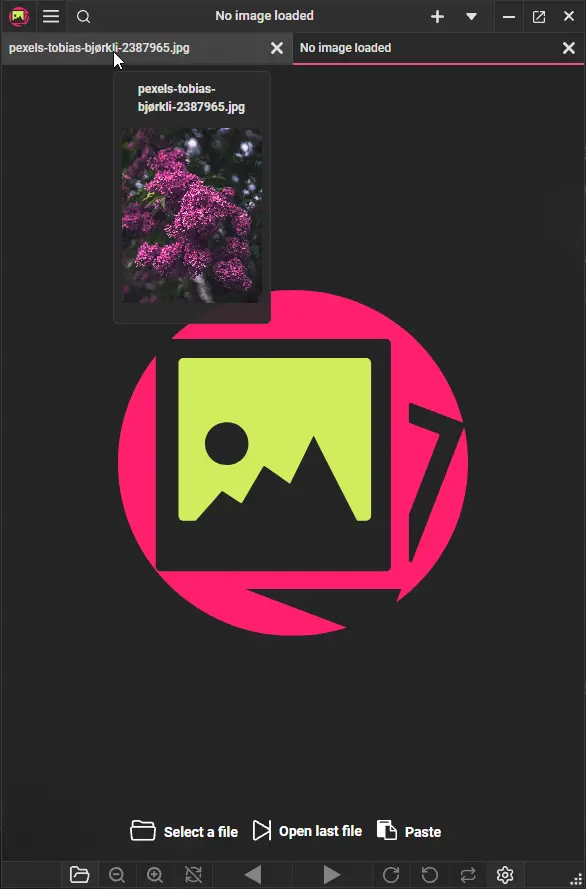
- Introduced a redesigned interface with support for tabbed navigation. When no additional tabs are open, the UI hides the tab panel so it effectively functions as a single image window (just like in prior releases).
Auto-fit windowno longer prevents you from resizing the window manually, and the macOS traffic light buttons are now available by default.- The bottom toolbar has been rebuilt with a focus on zooming and rotation, fixing usability issues on touch-only devices.
- Added a new
Renamedialog that shows up when the title bar is not visible. So you can still rename files while the UI is hidden, or when viewing in full screen. - The minimum window size has been lowered from 450 to 315 pixels. The window also dynamically adjusts to lower window sizes by hiding some buttons and automatically adjusting button sizes to fit.
- When the UI is hidden, a new toolbar displaying the file name appears when hovering the cursor at the top. Dragging it allows you to move the window.
- Improved the dropdown menu layout to make frequently used actions quicker and easier to access.
Animated AVIF
- Added support for playing
.aviffiles with multiple frames.
Zoom and image stretching
- The displayed zoom percentage is now calculated relative to the image’s original dimensions, rather than starting at 100% when the image is automatically fitted to the window.
- Renamed
Stretch imagetoZoom to fitfor better clarity (behavior remains unchanged).
Image gallery
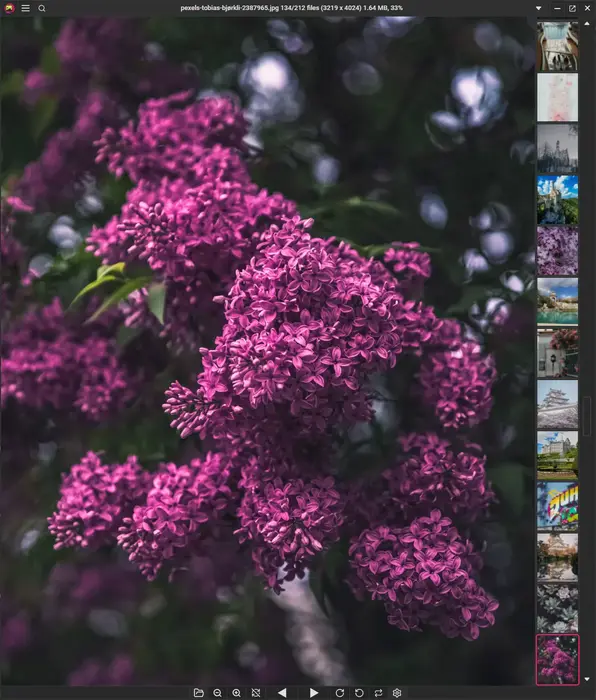
- The image gallery can now be docked to the top, left, or right side of the window, instead of being locked to the bottom.
- Renamed the
Show bottom gallerysetting toShow docked gallery at bottom. - Added an option to control whether the mouse wheel in the docked gallery navigates between images or scrolls the gallery itself.
Side-by-side view
- The
Side-by-sideview has been rewritten for improved performance and stability. - Viewing animated images Side-by-side (GIFs, WEBP) now works correctly.
Settings and Image Information
- Added a search bar to quickly find individual settings within the Settings window.
- The window is now resizable and remembers its size and position between sessions.
- The layout is now fully scrollable rather than being restricted to fixed, rigid categories.
- Added new settings to customize mouse side-button behavior. You can now set them to navigate between archives, folders, or stick to standard image navigation.
- Added a new dark background color that matches the toolbars in the dark theme.
- Added a setting to choose whether the title bar displays the full file path or only the current file name.
- Added
Always uncompress entire archiveoption in the settings window. - Made clock numbers easier to click when selecting a time in the Image information window.
- Added AM/PM toggle buttons (automatically hidden when using 24-hour time).
- Made hour and minute arcs clickable to set the time directly based on click position.
- The print window is now resizable and remembers previously used settings, printer selections, and window positions between sessions.
- Added a new
Export to PDFoption that converts the current image to a PDF using your last selected print settings. - The print preview now dynamically updates as you navigate through images.
Performance
- Drastically improved gallery loading times by virtualizing thumbnail generation—only rendering visible images and pre-fetching upcoming thumbnails during scrolling.
- Navigation now shares image caches between tabs and windows, significantly reducing memory usage when working with multiple tabs or windows.
- Optimized hot path functions to reduce memory allocations and improve overall performance.
- Archive loading has been redesigned, so the first image appears immediately while remaining files continue extracting in the background.
Windows
- Integrated native Windows thumbnails for faster thumbnail loading.
- The window now uses system borders and native shadows.
- Fixed native Windows thumbnails being shown upside down.
- Fix top-right corner close targets.
- Fixed an issue where the title bar menu could be truncated when using languages with longer words.
- Fixed a bug where the group type checkboxes were not selecting and unselecting correctly in the
File Associationswindow.
macOS
- PicView is now using native macOS thumbnails for faster thumbnail loading.
- Updated default keyboard shortcuts to better align with native macOS user expectations.
- Fixed issues with opening some JPEGs from Finder.
- Fixed the native top menu bar having blank and unclickable items.
Translations
- Improved Spanish translations and added Catalan language.
Bug fixes
- Fixed the
Save asfunction not working. - Fixed the image still showing an outdated cached version when saving the image.
- Fixed the update button not working in the
Aboutwindow. - Fixed image rotation issues when Auto-fit window is enabled.
- Fixed an issue where the window width failed to adjust during rapid image navigation with Auto-fit window enabled.
- Fixed an issue where Auto-fit window failed to center the window on startup when resuming from the last opened file.
- Fixed an issue where using the window centering function could cause a crash to desktop.
- Fixed gallery thumbnails becoming desynchronized after sorting files.
- Fixed tab title displaying loading when pasting from clipboard image or URL.
- The resize grip (bottom-right corner) in the main window is not working.
- Fixed memory leak when navigating between images.
- Fixed EXIF User Comment decoding across current and legacy encodings.
- Fixed Ctrl+S triggering image rotation instead of save by.
- Fixed
Side-by-SideArchive shows page 1 on both side instead of page 1 and page 2. - Fixed an issue where double-clicking a file with a mismatched extension failed to show the main window (#372).
- Fixed pasting text (e.g., URLs via
Ctrl + V) in the startup menu failing to load images. - Fixed certain instances where the title bar would show a loading title, even though it was not loading.
- Fixed the dropdown menu opening across multiple open windows simultaneously.
- Fixed the star rating buttons being hard to hit.
- Fixed a potential issue when deleting files until the watched directory is empty.
- Fixed some sliders and presets not working in the effects window.
- Fixed crash when starting up with a URL as an argument.
- Fixed some errors that could occur when selecting a date in the dropdown in
Image informationwindow, and improved text box date input entering. - Fixed some windows not being activated when attempting to open them again.
- Fixed the gallery hover button not showing up.
- Fixed some instances of multi-paged tiffs not navigating to the last page.
- Fixed a crash when opening the
Batch resizewindow when no image files were viewed. - Fixed the
Show docked galleryright click menu option not working and added a toggle to the settings window. - Various window size improvements at startup.
- Fixed embedded ICC profile rendering.
- Fixed an issue where navigating between multiple multi-page TIFF files could result in a blank view.
- Fixed various issues when starting
Cropmode while the UI is hidden. - Fixed an issue where the hover bar occasionally failed to appear.
- Fixed an issue with incorrect window sizing, when rotating when
Auto-fit windowis enabled. - Fixed an issue where the bottom half of the toolbar was not reacting correctly.
- Fixed the mouse-side buttons triggering left-button behavior.
- Fixed the
Effectswindow not being accessible in theApplication shortcutswindow. - Fixed certain animated GIFs not playing.
Miscellaneous
- The Previous and Next buttons are now disabled when the beginning or end of the image list is reached.
- The
Image Effectswindow now remembers its previous window position.
Internal updates
- Updated Avalonia to 12.1.1.
- Updated to .NET 11.
- Updated Magick.NET to 14.15.0.
- Updated R3 to 1.3.1.
- Updated SharpCompress to 0.50.4.
- Updated
Svg.Controls.Skia.Avaloniato 12.0.0.17. - Updated ZLinq to 1.5.6.